Robinhood Chain is an Ethereum compatible Layer 2 built for onchain finance, tokenized assets and crypto. Trust Wallet now supports Robinhood Chain natively, making it easier to receive, send and manage assets on the network.
Here is everything you need to know before adding and using Robinhood Chain on Trust Wallet.
How to Add Robinhood Chain to Trust Wallet
Trust Wallet now natively supports Robinhood Chain, so in most cases you do not need to manually configure the network. The simplest option is to add or select Robinhood Chain directly from the supported networks in the Trust Wallet app.
Method 1: Add Robinhood Chain Directly
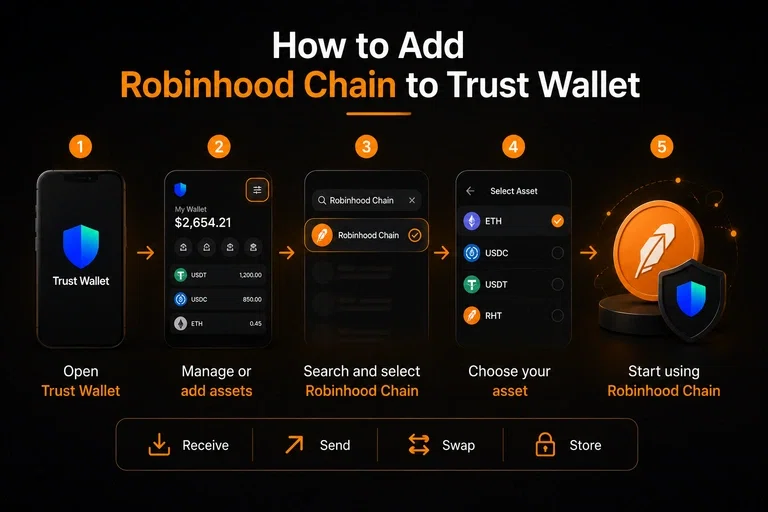
Open Trust Wallet
Open the latest version of the Trust Wallet app.Open Your Asset or Network List
From the wallet home screen, tap the option to manage or add assets.Search for Robinhood Chain
Search for Robinhood Chain and select the network when it appears.Select Your Asset
Choose the cryptocurrency or token you want to use on Robinhood Chain.Start Using Robinhood Chain
Once enabled, you can receive, send, store and swap supported assets on Robinhood Chain directly through Trust Wallet.
This is the recommended method because Robinhood Chain is already officially supported by Trust Wallet. The integration is available on Trust Wallet's mobile app and browser extension.
Method 2: Import Robinhood Chain as a Custom Network
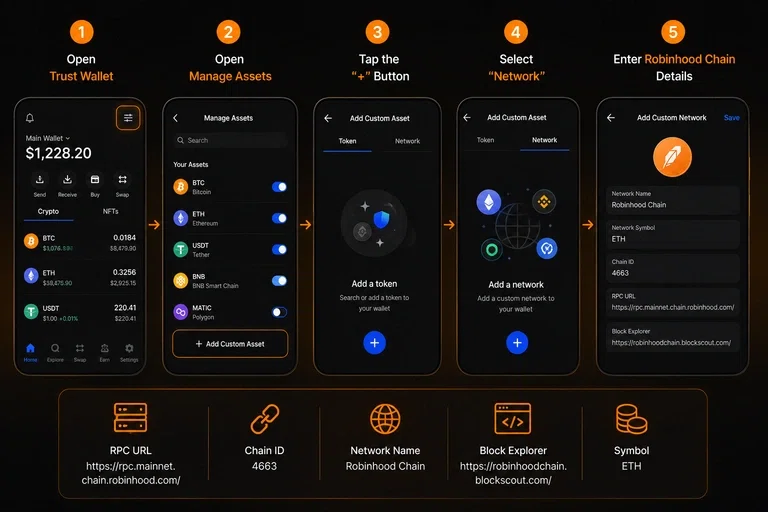
If Robinhood Chain does not appear automatically in your Trust Wallet, you can use Trust Wallet's custom network option.
Open Trust Wallet
Launch the Trust Wallet app and go to your main wallet screen.Open Manage Assets
Tap the Manage Assets icon in the top right corner.Tap the “+” Button
Select the “+” button to add a new asset or network.Select “Network”
Switch from the Token tab to the Network tab.Enter Robinhood Chain Details
Enter the following official mainnet information:
Setting | Robinhood Chain |
Network Name | Robinhood Chain |
Network Symbol | ETH |
Chain ID | 4663 |
RPC URL | |
Block Explorer |
Robinhood's official documentation lists Chain ID 4663, ETH as the native currency and the official mainnet RPC endpoint.
Trust Wallet's own custom network guide also recommends verifying network information and using a trusted RPC endpoint before adding a custom network.
Which Method Should You Use?
Use Method 1 if Robinhood Chain is already available in Trust Wallet. Since Trust Wallet now officially supports the network, this should be the preferred approach.
Use Method 2 only if Robinhood Chain is not showing up in your version of Trust Wallet. This gives users a fallback instead of assuming they have to manually configure the network from the beginning.
Important: Always verify the network details before sending funds. Using the wrong network or an incorrect RPC configuration can result in failed transactions or loss of access to assets.
What If Robinhood Chain Does Not Appear?
If Robinhood Chain is not showing in your Trust Wallet:
Update Trust Wallet to the latest version.
Restart the app.
Search specifically for "Robinhood Chain".
Make sure you are using the official Trust Wallet application or extension.
You should not manually enter network details from an unverified website.
For reference, the official Robinhood Chain network uses Chain ID 4663, with ETH as the native currency.
Robinhood Chain Stats
Robinhood Chain has grown rapidly since launching its mainnet.
Metric | Latest Available Data |
Mainnet launch | July 1, 2026 |
Chain type | Ethereum Layer 2 |
Technology | Arbitrum |
Native gas token | ETH |
DeFi TVL | $738M+ |
Stablecoin market cap | $796M+ |
24 hour DEX volume | $1.59B+ |
24 hour perpetual volume | $353M+ |
Bridged assets | $2.52B+ |
As of September 1, 2026, Robinhood Chain recorded approximately $1.595 billion in 24 hour DEX volume, while DeFi TVL stood at around $738 million and stablecoin market capitalization was close to $797 million.
The network has also experienced rapid growth in transaction activity. During its first week, Robinhood Chain processed more than 17 million transactions and attracted nearly 350,000 addresses.
These numbers show why Robinhood Chain has quickly become a network worth watching for users interested in tokenized assets, DeFi and onchain trading.
About Trust Wallet
Trust Wallet is a self custody crypto wallet that lets users store, send, receive and swap digital assets while maintaining control of their private keys.
The wallet supports 100+ blockchains and is available on mobile devices and as a browser extension. Trust Wallet reported crossing 220 million users or downloads and more than $30 billion in user asset balances.
Trust Wallet also supports Robinhood Chain directly. The integration allows users to send, receive, manage and swap assets on Robinhood Chain without manually configuring the network.
Other Topics to Read
How to Add Robinhood Chain to Metamask Wallet
Frequently Asked Questions (FAQs)
Is Robinhood Chain supported by Trust Wallet?
Yes. Trust Wallet added native support for Robinhood Chain in July 2026.
Do I need to manually add Robinhood Chain to Trust Wallet?
No. The latest Trust Wallet versions support Robinhood Chain natively.
What is the Chain ID for Robinhood Chain?
The Robinhood Chain mainnet Chain ID is 4663.
What token is used for gas on Robinhood Chain?
ETH is the native gas token.
Can I send and receive crypto on Robinhood Chain using Trust Wallet?
Yes. Trust Wallet supports sending, receiving and swapping supported Robinhood Chain assets.