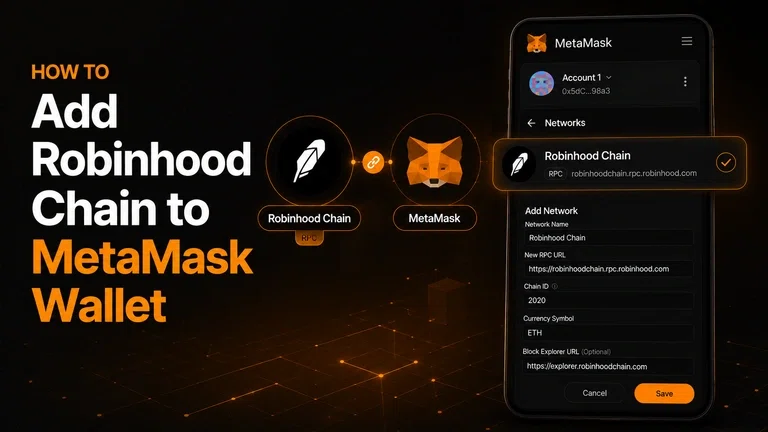
Robinhood Chain is an Ethereum compatible Layer 2 network designed around tokenized assets and onchain financial applications. Because it is EVM compatible, users can connect it to MetaMask and interact with Robinhood Chain using an existing MetaMask wallet.
In this guide, we will explain how to add Robinhood Chain to MetaMask, the network details you need, how to fund your wallet with ETH, and the security checks worth making before using the network.
Pay With Crypto Using Robinhood Chain
Robinhood Chain and MetaMask
Robinhood Chain is a Layer 2 blockchain built using Arbitrum technology and designed to support financial applications, tokenized assets and other onchain use cases. Since the network is EVM compatible, it works with EVM wallets including MetaMask.
Adding Robinhood Chain to your MetaMask wallet does not create a new wallet. Instead, you are adding another network to your existing wallet, allowing the same wallet address to interact with applications and assets on Robinhood Chain.
For anyone using MetaMask as their primary MetaMask crypto wallet, this means there is no need to create a completely separate wallet just to access the network.
The process is straightforward, but you should use the correct network information when adding Robinhood Chain manually. An incorrect RPC URL or Chain ID can prevent the network from working properly.
Robinhood Chain Network Details
Before adding the network manually, you need the correct Robinhood Chain configuration.
Setting | Robinhood Chain |
Network Name | Robinhood Chain |
RPC URL | https://rpc.mainnet.chain.robinhood.com/ |
Chain ID | 4663 |
Currency Symbol | ETH |
Block Explorer | https://robinhoodchain.blockscout.com |
The Robinhood Chain mainnet uses 4663 as its Chain ID and ETH as the native gas token.
If you are adding the network manually, double check each field before saving it. Network information can change over time, so it is always worth verifying the configuration against the latest official Robinhood Chain information.
Adding Robinhood Chain to MetaMask
The process of adding Robinhood Chain to your MetaMask wallet is similar to adding other EVM compatible networks.
The exact appearance of MetaMask can vary slightly depending on whether you are using the browser extension or mobile application, but the general process remains the same.
Step 1: Open MetaMask
Open your MetaMask crypto wallet and unlock it using your password or the security method enabled on your device.
Make sure you are using the official MetaMask extension or mobile application. Never enter your Secret Recovery Phrase into a website claiming to help you connect MetaMask to Robinhood Chain.
Step 2: Open the Network Selector
At the top of MetaMask, select the network you are currently using.
This could be Ethereum Mainnet or another network that you have previously added.
Look for the option to Add network or Add a network.
MetaMask supports multiple EVM networks, so you can add Robinhood Chain without replacing the networks already available in your wallet.
Step 3: Select the Custom Network Option
If Robinhood Chain is not already available in MetaMask's network list, choose the option to add a network manually.
MetaMask will display fields for information such as the network name, RPC URL, Chain ID, currency symbol and block explorer.
This is where you will enter the Robinhood Chain configuration.
Step 4: Enter the Robinhood Chain Details
Enter the following information:
Network Name:
Robinhood Chain
New RPC URL:
https://rpc.mainnet.chain.robinhood.com/
Chain ID:
4663
Currency Symbol:
ETH
Block Explorer URL:
https://robinhoodchain.blockscout.com
Check each field carefully before continuing.
Step 5: Save the Network
After entering the information, review the details and select Save.
MetaMask should then add Robinhood Chain to your available networks.
Open the network selector again and select Robinhood Chain. Your MetaMask wallet is now connected to the network.
Adding Robinhood Chain Manually
Manual configuration is useful if you want to enter and verify the network details yourself.
Open the network settings in MetaMask and enter:
Network name: Robinhood Chain
RPC URL: https://rpc.mainnet.chain.robinhood.com/
Chain ID: 4663
Currency: ETH
Block explorer: https://robinhoodchain.blockscout.com
Once saved, MetaMask should recognize Robinhood Chain as an available EVM network.
If you already use MetaMask across multiple networks, Robinhood Chain will simply appear alongside your other networks. You can switch between them from the network selector without creating another wallet.
Funding Your MetaMask Wallet on Robinhood Chain
Adding Robinhood Chain to your MetaMask wallet does not automatically transfer funds onto the network.
Your MetaMask address can exist on Robinhood Chain, but you need ETH on Robinhood Chain if you want to make transactions because ETH is used to pay network fees.
If you switch MetaMask to Robinhood Chain and see a zero ETH balance, that does not necessarily mean there is a problem. It simply means your wallet does not currently hold ETH on that particular network.
This is an important concept when using a MetaMask crypto wallet across multiple networks.
For example, if you have ETH on Ethereum Mainnet, that does not mean the same amount of ETH is automatically available on Robinhood Chain. Your wallet address may be the same, but balances are tracked separately across networks.
You can move supported assets onto Robinhood Chain using available bridging infrastructure and then use ETH on the network for transaction fees.
Checking Your Robinhood Chain Connection
Once Robinhood Chain has been added to MetaMask, there are a few simple checks you can make.
First, open the network selector and confirm that Robinhood Chain is selected.
Next, check your wallet address. When using compatible EVM networks, your MetaMask address generally remains the same even when you switch networks.
If you have already transferred ETH to Robinhood Chain, check your balance while Robinhood Chain is selected. Remember that looking at your Ethereum Mainnet balance will not show ETH held on Robinhood Chain.
You can also use the Robinhood Chain block explorer to check transactions and wallet activity.
If the network is not working correctly, go back into your MetaMask network settings and compare the RPC URL, Chain ID and other configuration details with the current Robinhood Chain configuration.
Robinhood Chain Mainnet vs Testnet
One thing to watch when adding Robinhood Chain to MetaMask is the difference between the mainnet and testnet.
The mainnet is the live network used for real transactions and assets. Its Chain ID is 4663.
The Robinhood Chain testnet is designed for development and testing and uses a different configuration.
Setting | Robinhood Chain Mainnet | Robinhood Chain Testnet |
Network Name | Robinhood Chain | Robinhood Chain Testnet |
Chain ID | 4663 | 46630 |
RPC URL | https://rpc.mainnet.chain.robinhood.com/ | https://rpc.testnet.chain.robinhood.com |
Currency Symbol | ETH | ETH |
If you want to use the live Robinhood Chain ecosystem, make sure you select the mainnet configuration.
The testnet should generally be used for development and experimentation rather than transactions involving real value.
Security Tips for Using MetaMask
Adding a custom network to MetaMask is straightforward, but you should still take basic security precautions.
Always verify the RPC URL and Chain ID before adding a network. Avoid copying network information from random social media posts, Telegram groups or unknown websites.
More importantly, never give your Secret Recovery Phrase or private key to anyone.
Adding Robinhood Chain to a MetaMask wallet does not require you to reveal your recovery phrase. If a website or person asks for it as part of the setup process, stop immediately.
You should also remember that adding a network to MetaMask does not automatically make every application on that network trustworthy. Always check the website you are connecting to and understand the transaction or token approval before signing it.
A MetaMask crypto wallet gives you control over your assets, but that control also means you are responsible for protecting your wallet and approving transactions carefully.
Conclusion
Adding Robinhood Chain to MetaMask is a relatively simple process because the network is EVM compatible.
You can add it through MetaMask's network interface or configure it manually using the Robinhood Chain parameters. The key details to remember are Chain ID 4663, the Robinhood Chain mainnet RPC endpoint and ETH as the network's gas currency.
Once added, your existing MetaMask wallet can interact with Robinhood Chain without requiring you to create another wallet. You will, however, need ETH on Robinhood Chain if you want to make transactions.
For users who already rely on MetaMask as their MetaMask crypto wallet, adding Robinhood Chain provides another way to access the growing ecosystem of onchain financial applications and tokenized assets.
Frequently Asked Questions (FAQs)
Can MetaMask connect to Robinhood Chain?
Yes. Robinhood Chain is EVM compatible and can be added to MetaMask as a custom network.
What is the Chain ID for Robinhood Chain?
The Robinhood Chain mainnet Chain ID is 4663.
What token does Robinhood Chain use for gas?
Robinhood Chain uses ETH as its native gas token.
Can I use my existing MetaMask wallet on Robinhood Chain?
Yes. You can add Robinhood Chain to an existing MetaMask wallet without creating a new wallet.
Why can't I see my ETH after switching to Robinhood Chain?
ETH balances are network specific. ETH held on Ethereum or another network will not automatically appear as a balance on Robinhood Chain. You need ETH on Robinhood Chain to use it for gas.