Staying connected should not require a complicated payment process. A Lyca Mobile recharge voucher or gift card can be a simple way to add credit to a prepaid mobile account, whether you are topping up your own number or sending credit to someone else.
In this guide, we will explain how Lyca Mobile recharge gift cards work, how to buy one, how to redeem the voucher, and how you can use 0fiat to buy supported gift cards with crypto.
What Is a Lyca Mobile Recharge Gift Card?
A Lyca Mobile recharge gift card is essentially a prepaid voucher that can be used to add credit to a Lyca Mobile account or, depending on the market and voucher type, redeem a specific mobile plan.
Instead of paying for a recharge directly with a debit or credit card, you purchase a voucher containing a unique code or PIN and then redeem it against the relevant Lyca Mobile account.
The exact redemption method, denominations, validity and available services can vary by country. For example, Lyca Mobile's Australian service supports recharge through its app, website and physical vouchers, while other Lyca Mobile markets have their own recharge processes.
This country specific nature is important when buying a Lyca Mobile gift card. A voucher intended for one country may not work with a Lyca Mobile number registered in another country.
How Lyca Mobile Gift Cards Work
The process is fairly straightforward.
You purchase a Lyca Mobile recharge voucher for the appropriate country and value. The voucher is then delivered digitally, usually as a PIN or recharge code.
Once you receive the code, you redeem it through the available Lyca Mobile method for your region.
Depending on the market, this can include:
Lyca Mobile's website
The Lyca Mobile app
Your My LycaMobile account
A USSD recharge code
Other methods provided by Lyca Mobile
The credit can then be used toward eligible mobile services such as calls, SMS, mobile data or prepaid bundles.
For example, some Lyca Mobile markets allow users to redeem a voucher through their account by selecting the voucher or recharge option and entering the supplied PIN.
This makes a Lyca Mobile gift card useful not only for your own phone but also when you want to send mobile credit to someone else.
How To Buy Lyca Mobile Recharge With a Gift Card
If you already have a Lyca Mobile gift card or recharge voucher, the redemption process generally follows a few simple steps.
Step 1: Check the voucher region
Before using the voucher, check which country it was issued for.
This is one of the most important things to verify because Lyca Mobile vouchers can be region specific.
Make sure the voucher matches the country associated with the Lyca Mobile number you want to recharge.
Step 2: Check the voucher value
Confirm the denomination of the voucher.
Depending on the market, gift cards and recharge vouchers can be available in different values. The credit may be added to your PAYG balance or used toward a specific prepaid bundle.
Step 3: Open Lyca Mobile
Go to the Lyca Mobile website or open the Lyca Mobile app for your region.
Log in to your account if required and find the recharge or voucher redemption option.
Step 4: Enter the voucher code
Enter the unique PIN or recharge code supplied with your gift card.
Make sure the code is entered exactly as provided.
Step 5: Confirm the recharge
Submit the voucher and wait for the confirmation.
Once successfully redeemed, the applicable credit or plan should be added to your account according to the voucher's terms.
Some Lyca Mobile markets also support USD based voucher redemption. The exact code varies by country, so always follow the instructions supplied with your specific voucher.
How To Buy Lyca Mobile Gift Cards With Crypto
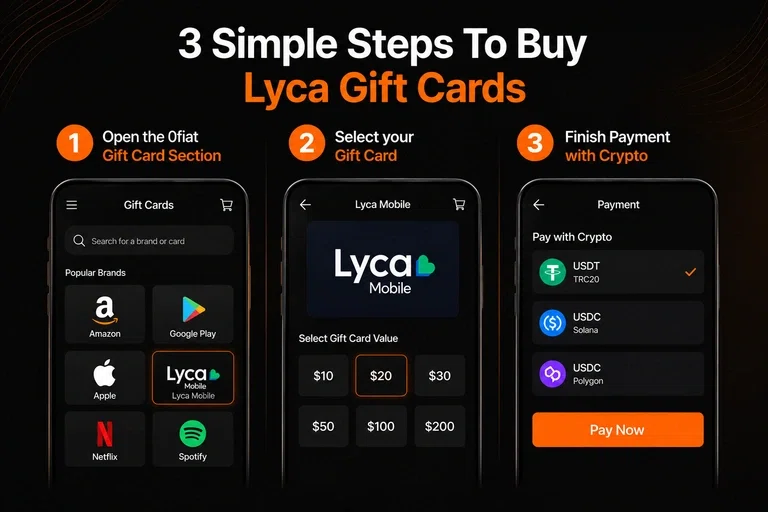
If you hold crypto and want to use it for mobile recharges, a gift card can provide a convenient bridge between your digital assets and prepaid mobile services.
The process is similar to buying any other digital gift card with crypto.
Step 1: Find the Lyca Mobile gift card
Visit the 0fiat gift card section and search for Lyca Mobile.
Check whether a Lyca Mobile recharge or gift card is currently available for the country you need.
Availability and denominations can change, so confirm the specific card before purchasing.
Buy gift cards with crypto using 0fiat
Step 2: Select the country and denomination
Choose the appropriate Lyca Mobile market and the amount you want to recharge.
This step is particularly important for Lyca Mobile because vouchers can be tied to a specific country or currency.
If you are buying the voucher for someone else, make sure their Lyca Mobile number is registered in the same supported region.
Step 3: Choose your crypto
Select one of the supported crypto payment options shown at checkout.
For users who prefer stablecoins, 0fiat supports USDT and USDC for eligible purchases.
Check the blockchain network carefully before approving the payment. Sending an asset over an unsupported network can result in the payment not being completed correctly.
Step 4: Pay directly from your wallet
Approve the payment from your crypto wallet.
One of the main differences with 0fiat is that you do not need to first transfer your crypto into a separate card balance. The payment is made from your own wallet.
This also means you can use crypto that you already hold rather than converting it into fiat before purchasing the recharge.
Step 5: Receive the voucher
Once the payment is completed, the digital gift card or recharge code is provided according to the delivery method shown at checkout.
Keep the code secure until it is redeemed.
Step 6: Redeem the Lyca Mobile recharge
Use the instructions supplied with the voucher to add the credit to your Lyca Mobile account.
The exact process depends on the country and voucher type, so follow the relevant redemption instructions rather than assuming the same USSD code works everywhere.
Why Use 0fiat for Gift Card Purchases?
The main advantage of using 0fiat is that you can use crypto directly for supported gift card purchases instead of converting your crypto to fiat first.
For someone who already holds USDT or USDC, the process can be much more straightforward.
There is also no need to use a crypto card simply to purchase a digital voucher. You can pay directly from your wallet.
0fiat is non custodial, so your funds remain in your wallet until you approve a payment. It also does not require KYC for its crypto payment flow and charges zero 0fiat transaction fees. Standard blockchain network fees may still apply.
This makes the approach particularly useful for crypto users who want to keep their spending self custodial.
Explore supported gift cards on 0fiat
Things To Check Before Buying a Lyca Mobile Gift Card
A few details are worth checking before you purchase a Lyca Mobile recharge voucher.
Check the country
Do not assume that a Lyca Mobile voucher works globally.
Always select the country that matches the Lyca Mobile account you want to recharge.
Check the denomination
Make sure the voucher amount is suitable for the recharge or plan you want to purchase.
Some vouchers provide general PAYG credit, while others may be tied to a specific bundle.
Check the expiry
Gift card and recharge voucher validity can vary by market and product.
Check the expiry terms before purchasing and redeem the voucher within the stated period.
Check the redemption method
The way you redeem the voucher can differ between Lyca Mobile markets.
Some support online redemption through the app or account, while others may provide a USSD code or another method.
Keep the code private
Treat a digital recharge code like cash.
Do not share it publicly or with anyone who does not need it. Once a voucher code has been exposed or redeemed, recovering the value can be difficult.
Conclusion
A Lyca Mobile recharge gift card offers a simple way to add prepaid credit without having to make a direct payment to the mobile operator each time.
The important thing is to choose the correct country, denomination and voucher type before purchasing. Once you have the right voucher, you can redeem it through the supported Lyca Mobile app, website, account or recharge method.
For crypto users, 0fiat provides another option. If a Lyca Mobile gift card is available for your region, you can use supported crypto such as USDT or USDC to purchase it directly from your wallet.
That gives you a practical way to turn crypto into mobile credit without first converting it into fiat or relying on a crypto card.
Frequently Asked Questions (FAQs)
Can I buy a Lyca Mobile recharge with a gift card?
Yes. Lyca Mobile recharge vouchers can be redeemed to add eligible credit or activate supported prepaid services, depending on the country and voucher type.
Can I buy a Lyca Mobile gift card with crypto?
Yes, if a Lyca Mobile voucher is available for your region through a supported crypto gift card service such as 0fiat.
Can I use a Lyca Mobile gift card in another country?
Usually not. Lyca Mobile vouchers can be region specific, so check the country of validity before purchasing.
Can I send a Lyca Mobile recharge gift card to someone else?
Yes. A digital recharge voucher can generally be shared with another Lyca Mobile user, provided the voucher is valid for their region.
Can I buy Lyca Mobile gift cards with USDT or USDC?
If the relevant Lyca Mobile gift card is supported, 0fiat allows eligible gift card purchases using supported stablecoins including USDT and USDC.