Looking for a simple way to buy Robux with crypto? With 0fiat, you can purchase supported Robux gift cards and pay directly with crypto from your wallet.
Instead of converting your crypto to fiat first, the process takes place through a simple gift card checkout. Choose your country, select the gift card value, pick your payment chain and finish the transaction with Scan & Pay.
What Is a Robux Gift Card?
Robux is the virtual currency used on Roblox. It can be used for purchases across the Roblox ecosystem, including virtual items, accessories, experiences and other digital content.
A Robux gift card provides another way to add value to a Roblox account. For crypto users, it also creates a simple way to turn crypto into a digital purchase without first converting it into traditional currency.
Can You Buy Robux With Crypto?
Yes. You can buy Robux with crypto by purchasing a supported Robux gift card through 0fiat.
The process is designed to be straightforward. You don't need to go through a separate crypto-to-fiat conversion before making the purchase. Instead, you select the gift card you want and complete the payment using a supported crypto asset and blockchain.
How to Buy Robux Gift Cards With Crypto on 0fiat
Buying a Robux gift card with crypto through 0fiat takes four steps.
Step 1: Choose Your Country & Region
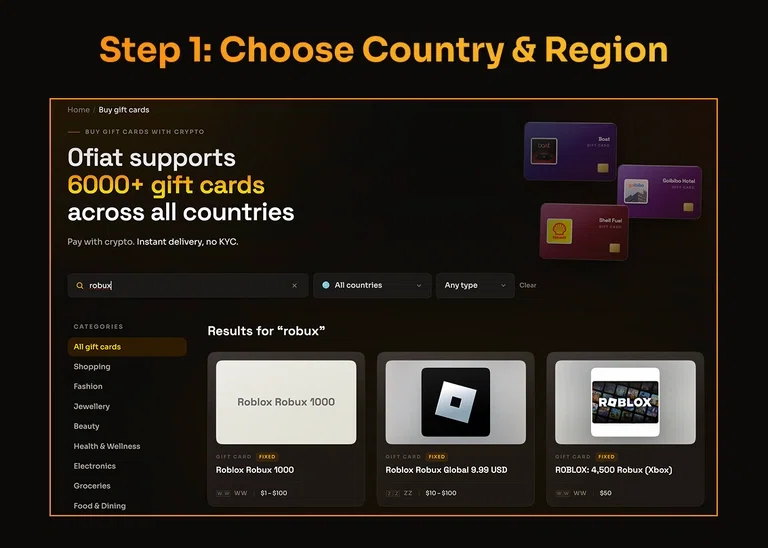
Open 0fiat and go to the Gift Cards section.
Search for Robux and select the gift card option. Start by choosing your country and region.
This step is important because gift cards can have regional restrictions. Make sure you select the country or region where the gift card will be used before continuing.
Step 2: Select Your Gift Card Value
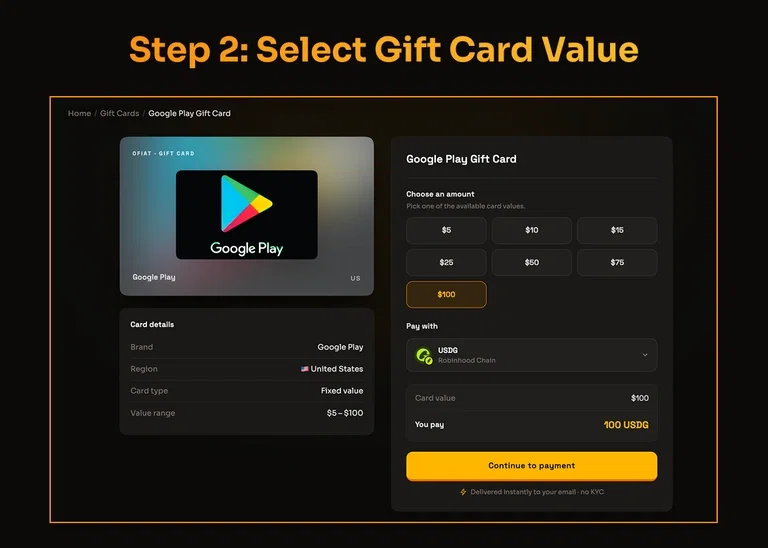
Once you've selected the appropriate country and region, choose the Robux gift card value you want to purchase.
Select the available denomination that matches what you need and review the gift card details before moving to payment.
If you're purchasing the gift card for someone else, make sure the selected region and value are compatible with their Roblox account.
Step 3: Choose Your Payment Chain
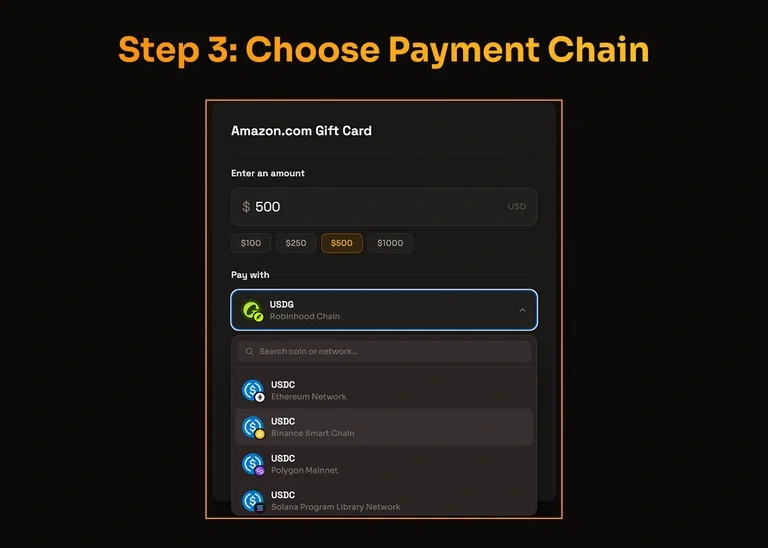
Next, choose how you want to pay for the gift card.
Select the available payment chain and supported cryptocurrency shown at checkout. Make sure the crypto asset and network you select match the funds available in your wallet.
Before proceeding, review the payment amount and network carefully. Choosing the correct blockchain is especially important when making crypto payments.
Step 4: Scan & Pay to Finish Payment
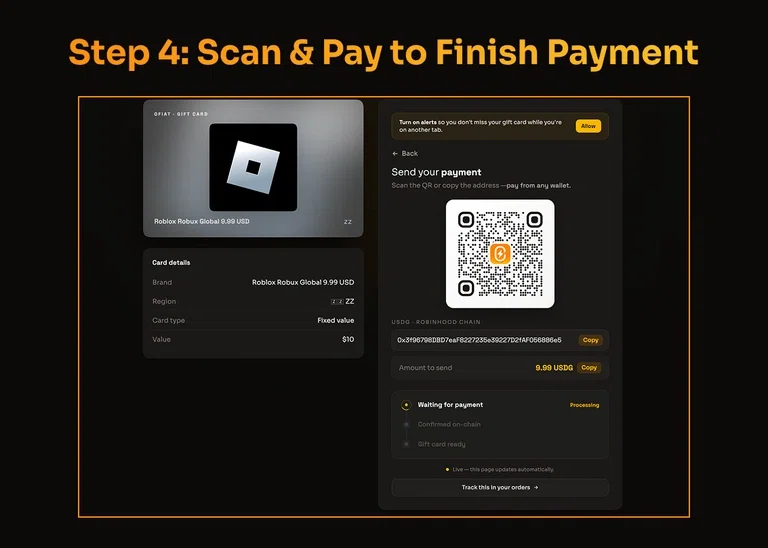
Once you've selected your payment method, 0fiat will provide the payment details for your transaction.
Open your crypto wallet, scan the payment QR code, review the transaction details and approve the payment.
Once the payment is confirmed, your Robux gift card will be delivered according to the order details.
That's it. Four steps from your crypto wallet to a Robux gift card.
Why Buy Robux With Crypto?
Crypto can be used for more than trading and investing. Gift cards provide a practical way to use digital assets for everyday online purchases.
When you buy Robux through 0fiat, you can go directly from your crypto wallet to a digital gift card without first converting your crypto into fiat.
The process is simple:
Choose your region → Select your value → Choose your payment chain → Scan & Pay
This can be particularly convenient for crypto users who already hold supported assets and want to use them for digital purchases.
What Crypto Can You Use to Buy Robux?
The available cryptocurrencies and blockchain networks are displayed during the 0fiat checkout process.
Payment options can vary depending on the gift card and availability. Always check the payment options shown at checkout before starting the transaction.
If you already hold a supported cryptocurrency in your wallet, select the corresponding payment option and complete the transaction from your wallet.
What to Check Before Buying a Robux Gift Card
Before you buy Robux, there are a few details worth checking.
Check the Country and Region
Gift cards may be restricted by country or region. Select the correct region during the first step and make sure it matches where the gift card will be used.
Check the Gift Card Value
Review the available denominations and select the value you actually need before proceeding to payment.
Check the Payment Chain
Make sure the blockchain network you select matches the crypto you're sending from your wallet.
For example, having the right token on the wrong network can result in a failed transaction or potentially lost funds.
Review the Payment Before Scanning
Before approving the transaction, check the payment amount, cryptocurrency and network. Once everything looks correct, scan and complete the payment from your wallet.
Frequently Asked Questions (FAQs)
Can I buy Robux with crypto?
Yes. You can purchase supported Robux gift cards through 0fiat and pay using the available cryptocurrency and blockchain options at checkout.
How do I buy Robux with crypto on 0fiat?
Open 0fiat and go to the Gift Cards section. Select Robux, choose your country and region, select the gift card value, choose your payment chain and complete the purchase using Scan & Pay.
Do I need to convert my crypto into fiat first?
No. You can pay for a supported Robux gift card directly with crypto through the 0fiat checkout.
Can I pay directly from my crypto wallet?
Yes. The payment is completed from your crypto wallet using the supported cryptocurrency and blockchain network selected at checkout.
Why do I need to select a country and region?
Gift cards can have regional restrictions, so selecting the correct country and region helps ensure that the gift card is compatible with its intended use.
What should I check before paying?
Check the country and region, gift card value, payment cryptocurrency and blockchain network before scanning and approving the transaction.